Peppol self-billing
The buyer issues a self-billed invoice on the supplier’s behalf. To test it, use two sandbox companies with Peppol IDs. Save each company as a contact in the other’s address book. The buyer needs a verified sending identity.
Test in the hosted sandbox
Sign in as a company administrator. In the supplier company, open Invoice settings → Self-billing and enable receipt. Open the buyer’s saved contact and record the agreement with the role The buyer issues invoices on our behalf. In the buyer company, select the supplier’s contact and We issue invoices on behalf of the supplier. Enter the written reference, acceptance procedure and dates on both sides.
The current company settings endpoints accept changes from a signed-in company administrator. Use the administrator’s access token as an Authorization: Bearer credential. The sandbox base URL is https://api.sandbox.efakturuj.sk/api/v1. These are the actions available under /companies/{company_id}/settings/self-billing.
| Action | Method and suffix |
|---|---|
| Check or change receiving | GET or PUT on the settings path |
| Record one role for a saved contact | PUT /contacts/{contact_id} |
| List documents waiting for review | GET /holds |
| Review a corrected hold | POST /holds/{message_id}/review |
The company console supplies the contact ID when you edit its agreement. For the illustrated €12.30 exchange and €2.46 credit note, follow the six-step self-billing guide.
Preview of company and partner API keys
The following credential paths, the Tax & Peppol → Self-billing layout and partner-console editing have been tested in a local build. API-key writes, contact search and agreement read-back are awaiting their hosted sandbox rollout. Use the administrator workflow above for a test in the current sandbox.
| Credential in the preview | Company you are configuring | Settings path |
|---|---|---|
| Company API key | The company that owns the key | /companies/{company_id}/settings/self-billing |
| Workspace API key | The selected company in the key’s workspace | /companies/{company_id}/settings/self-billing |
| Partner API key | A client managed by that partner | /partner/clients/{company_id}/settings/self-billing |
In the preview, grant self_billing:manage to the key and send it in X-API-Key. A partner administrator opens Clients → Edit → Tax & Peppol → Self-billing for the relevant client. The agreement editor below its switch searches that client’s contacts by name or Peppol ID. Creating and sending an invoice use the normal invoices:write and invoices:send scopes.
1. Enable receipt for the supplier
Send PUT to the supplier’s settings path with {"enabled":true}. Read the same path with GET. Wait until the response shows enabled: true and pending: false before sending the first invoice. To disable receipt, set enabled to false.
For a test on the hosted sandbox, set COMPANY_ID to the supplier’s UUID and use that company administrator’s access token.
curl --request PUT \
  "https://api.sandbox.efakturuj.sk/api/v1/companies/${COMPANY_ID}/settings/self-billing" \
  --header "Authorization: Bearer ${ADMIN_ACCESS_TOKEN}" \
  --header 'Content-Type: application/json' \
  --data '{"enabled":true}'
2. Record the agreement on both sides
Append /contacts/{contact_id} to each company’s settings path. Use the saved contact’s ID. The API-key preview also provides GET /contacts?q={name_or_peppol_id} under the company’s settings path. PUT saves the written agreement for one role. In the buyer company, select the supplier’s contact and send the following body, replacing the example terms with the terms of your agreement.
{
  "role": "company_issues",
  "terms": {
    "reference": "SB-17",
    "acceptance": "The supplier confirms each invoice in writing.",
    "valid_from": "2026-01-01",
    "valid_until": null,
    "manual_approval": true
  }
}
In the supplier company, select the buyer’s contact and send the corresponding terms with role set to buyer_issues. The response includes the contact’s Peppol ID for each saved role. In the preview, GET on the same URL reads both roles. To revoke one, send {"role":"buyer_issues","terms":null} with the role you want to revoke.
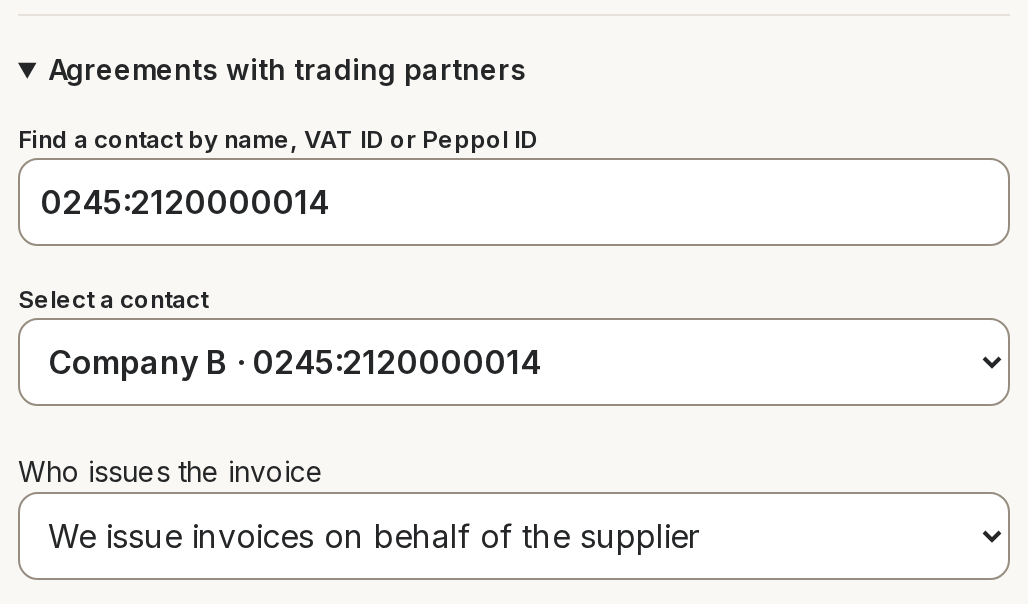
In the company UI, edit the agreement on the contact’s Information tab. In the partner UI preview, expand Agreements with trading partners under the client’s self-billing switch, choose the contact and save the terms.
In the example below, the partner is editing Company A and searches for its supplier, Company B, by 0245:2120000014. A Slovak DIČ uses 0245: followed by the ten digits of the tax ID. For your own test, enter the Peppol ID assigned to your sandbox supplier and check that it also appears beside the selected contact.
3. Issue an invoice and check both companies
Create a draft through the buyer’s normal POST /companies/{company_id}/invoices or POST /partner/clients/{company_id}/invoices endpoint. Supply the usual invoice fields, including dates and lines, and set the following fields.
| Field | Self-billed invoice | Linked self-billed credit note |
|---|---|---|
self_billing_code | "389" | "261" |
invoice_type | "380" | "381" |
customer_id | Agreed supplier’s contact ID | Same supplier’s contact ID |
preceding_invoice_number | Omit | Number of the sent self-billed invoice |
Use source: "api" or omit it to accept the default. eFakturuj uses the verified company as buyer and the agreed contact as supplier. Validate and send using the invoice’s current version. After delivery and booking, look for the invoice under Received in the buyer company and Issued in the supplier company. Follow the normal validation and send steps for the credential you use. Company API · Partner API
4. Review a held document
Read GET /holds under the supplier’s settings path. For agreement_required or receiving_disabled, correct the stated condition and send POST /holds/{message_id}/review with {"evidence":"Signed agreement SB-17"}, using your actual supporting reference. The response {"status":"pending"} queues another booking attempt. A debit note or a content conflict requires manual accounting review.